


Buy Advanced Optimization Report
The purchase is made through the international payment system PayPal. You can pay either from your PayPal balance or as a guest using a credit card (instructions are below).
Immediately after payment, an account will be automatically created for you on our website, in it you can download the program and the activation key. In total, 5 keys are available. Details below.
Your purchase of the software means that you have read and accepted the Policies.
The cost is $29.99.
This software can also be purchased on the official MQL5 website: https://www.mql5.com/ru/market/product/158705
Payment in USDT.
By internal transfer of the ByBit exchange. Or by external transfer. First, you need to create an account on our website. After confirming your email, you will need to transfer USDT to the specified number. After making the payment, please report it using the feedback form on the website. Provide your account for the funds to be credited. Payments are processed manually on business days.
Log in to your account or register by filling out the form:
Notes:
The first launch and key entry.
Immediately after purchase, you need to download the Expert Advisor to the Experts folder and run it, leaving the Key input field blank. It will read the computer's parameters and print them in the Experts tab's messages.
Example:
SIG_70BF30096CD9212A37EFFD630DB
Copy the resulting string and send it through the form in your account on the website. This will create a key that can only be accepted on your computer and only in the terminal used to generate the key (if you have multiple terminals).
Re-launch the Expert Advisor and in the Inputs tab, insert the key in the Key input field.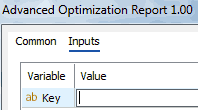
After that, the Expert Advisor will save the key on the disk and will check it automatically every time it is launched.
If you accidentally remove the key, you can copy it from your account on the website. If you reinstall your OS, change your user, reinstall the MT5 terminal, or change your hardware, the key will no longer work, but you can still get four more keys. You can install additional keys on your secondary computer, for example.
Do not share the key with others for free, as this reduces the number of additional keys available to you. Once you have used five keys, you will need to purchase a new key at full price.
When registering your account, use your own email address instead of a one-time email to ensure that you can receive additional keys when you reinstall your OS or hardware.
Pay with a card as a guest in PayPal
If you do not have a PayPal account, then pay with a card as a guest. To do this, in the opened window, click Create an Account.
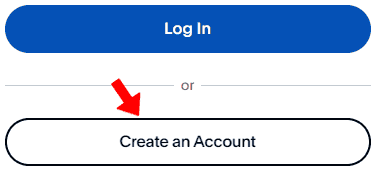
In the next window, select your country and check if there is a Save Information & Create your PayPal account switch at the bottom of the form. If not, then select another, for example, the USA. Turn it off:

Enter your payment card and address. It is important to specify your valid email, because on it will be registered an account on this site from which you can download the program and generate an activation key.
Then click the button Pay now as guest.
© 2025 - 2026